Jump to HeaderJump to Main ContentJump to Footer
Michigan State University
D2LHelp

D2LHelp

  • Digital Hub
  • |
  • MSU Documentation
  • |
  • D2L Documentation
  • |
  • Training
  • |
  • D2L Retention
  • |
  • D2L's Known and Fixed Issues
  • |
  • FAQ
D2LHelp
  • Digital Hub
  • MSU Documentation
  • D2L Documentation
  • Training
  • D2L Retention
  • D2L's Known and Fixed Issues
  • FAQ

< Digital Hub

< MSU Documentation

< D2L Documentation

< Training

< D2L Retention

< D2L's Known and Fixed Issues

< FAQ

D2L Help > MSU Documentation > Course Space Creation and Customization >

New Course Creation Tool

New Course Creation Tool

Michigan State University

NEED HELP?

  • MSU IT Service Desk
  • D2L Request Form

D2L AT MSU

  • Frequently Asked Questions
  • Known Issues

PHONE

Local: (517) 432-6200 Toll-free: (844) 678-6200 (North America and Hawaii)

NOTICE

If you notice any help page that has incorrect information or is outdated, please contact us.

If you're having accessibility issues, please let us know.

Michigan State University
  • Contact Information|
  • Site Map|
  • Privacy Statement|
  • Site Accessibility|
  • Call MSU: (517) 355-1855|
  • Visit: msu.edu|
  • Notice of Nondiscrimination|

SPARTANS WILL|© Michigan State University|

MSU Faculty, Staff and Graduate Assistants have the ability to create D2L Course Offerings

The Course Creation Tool is intended for instructors requiring a D2L space for projects beyond their regular academic courses. Instructors can utilize these spaces for idea testing, materials preparation, or peer collaboration.

REMINDER: Spaces for official "University Credit" course offerings are generated by the relevant departments and are not created by individual instructors through this tool.

The redesigned Create a D2L Course tool now includes multiple course types with descriptions clearly outlining the benefits of each option. Choose the one that aligns best with your needs. For more information on these updates, please refer to the Information Regarding Recent Changes section below.

Instructions for creating a course can be found further down the page.

Information regarding recent changes

Why the change?

The university's contract with D2L Brightspace requires a cost structure for utilizing the platform for professional development and non-credit courses. Although MSU IT has significantly subsidized these expenses, we are now collaborating with departments to establish sustainable measures for maintaining these offerings.

What has changed?
  1. Addition of two new course types: Non-Credit and Professional Development.
  2. Development courses will no longer be able to use the Self Enroll tool, Batch enroll, or D2L-to-Microsoft Teams Site Integration.
  3. Certain course types will require the creator to provide additional information on the course and its business needs.
  4. Going forward, we are eliminating the Dev Course Admin and Community Admin roles. We will be replacing them with one single Org Unit Admin that has the same permissions.

Instructions for Faculty and Staff

  1. Login to D2L and navigate to your My Home page.
  2. Under the My Courses widget click on the Create a Course link.
  3. Browse the available course types and select the option that best suits your needs.
  4. Fill in required fields where applicable (e.g. affiliated department, account number, and business need).
  5. Type a unique name in the Course Title field.
  6. Click the Create... Button.
  7. When you receive the following message, "Course creation successful", your new course space is available from the link below it. Click the link to be taken to your new D2L course space.

Graduate Assistants

  1. Please click this link to reach the Create a Course tool.
  2. Browse the available course types and select the option that best suits your needs
  3. Fill in required fields where applicable (e.g. affiliated department, account number, and business need).
  4. Click the Create... button.
  5. When you receive the message, "Course creation successful", your new course space is available from the link below it. Click the link to be taken to your new D2L course space.
What are the course types?
  • For Credit: D2L course spaces are automatically created for all MSU for credit courses. The instructor of record simply needs to enable the course. The central MSU/D2L site licenses cover all for-credit courses.
  • Development/Sandbox: A space for developing your D2L content, intended to be used by individuals or small groups to practice or test D2L features and tools.
  • Community: A space for social groups, clubs, and committees to communicate outside of a formal educational setting.
  • Non-Credit: Standalone courses and instructional programs that do not offer academic credit.
  • Professional Development: Career training and other ongoing experiences intended to advance workplace skills and opportunities.
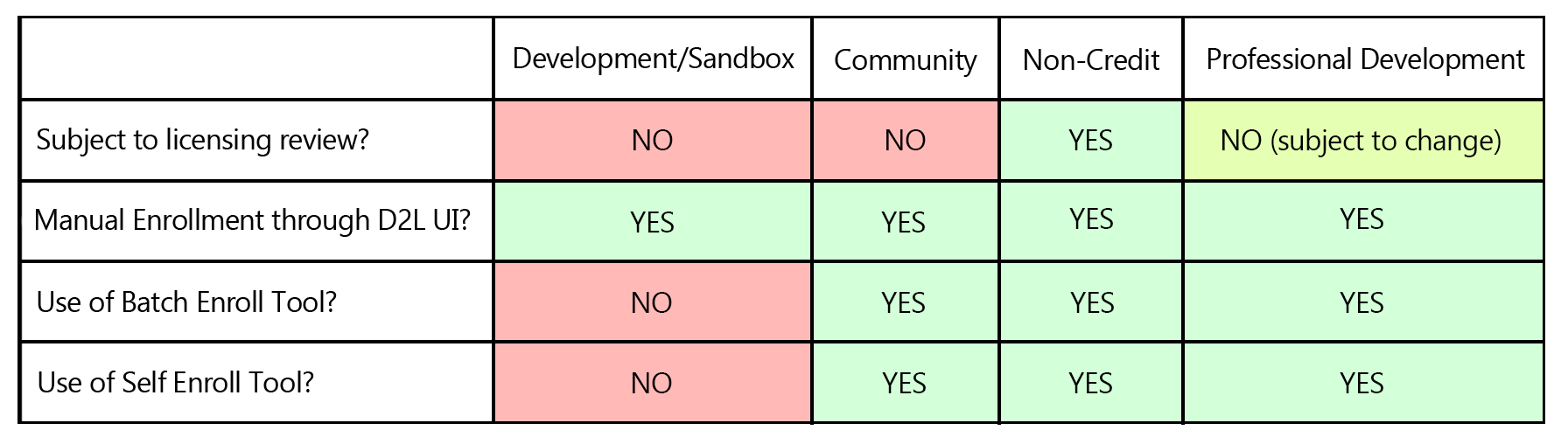
Table of D2L course types
 

What does "Subject to licensing review" mean?

Under the university's agreement with D2L Brightspace, specific courses will incur licensing fees based on user enrollment. For more information on the new licensing rules and whether or not your course is subject to review, please refer to our Subject to Licensing Review help page.

Is there a charge for these new courses?

Yes, there is a potential charge. Beginning July 1, 2024, MSU IT will implement a fee of $2 per non-credit enrollment for colleges and units, unless the course is explicitly cost-free for users. It's important to note that this fee only applies to non-credit and professional development offerings initiated on or after the above date.

The $2 per user charge will allow for the continued growth of our non-credit course offerings. MSU IT will bill charges for non-credit D2L enrollees annually, with the first bill in August 2025.

Who is affected by this change?

The change affects professional development and non-credit courses starting this academic year. It is important to note that this new contract does not affect faculty and student use of D2L for all credit courses.

How will this change affect my existing Development/Community org units?

We understand that there are many active Development organizational units in D2L. While newly created Development courses may have access to only some of the features they previously had, we are implementing a transition period for existing course offerings.

For existing Development Courses:

  • If a current development course has self-enroll activated, its self-enrollment page will function normally, enabling users to self-enroll. However, should the self-enrollment feature be deactivated for a course, this modification will be permanent, and reactivating self-enrollment will not be an available option.
  • MSU IT plans to temporarily extend the use of the Batch Enroll Tool for Development courses created prior to Dec. 20, 2023. However, effective July 1, 2024, this option will be deactivated, prohibiting all development courses from utilizing the batch enroll tool. If you are currently employing a Development Course to facilitate learning for multiple users, we advise creating a new course using an alternative course type and subsequently transferring your content. Please note that student data will not be duplicated in this process.
Why add additional org unit types?

We aimed to meet our users' diverse needs by introducing different types of courses. By adding new course options and implementing specific tool restrictions for each type, we've given each category unique features that serve specific purposes.

Why do I have to provide an account/subaccount number?

To comply with the cost structure and billing procedures, MSU IT must be able to identify the program or department associated with any newly created course. Completing the account/sub-account field will facilitate this process, allowing MSU IT to collaborate directly with the colleges when billing is necessary.

What information do I need to include under the “Business Needs” field?

The "Business Needs" field is mandatory and should include, in plain language, the course's purpose or the requirement it addresses for you, your program, or department.